Invoice Maker › Templates › Free Word Invoice Template
Free Word Invoice Template
A clean, editable invoice for Microsoft Word, Google Docs, Pages and LibreOffice. Download it, drop in your details and send.
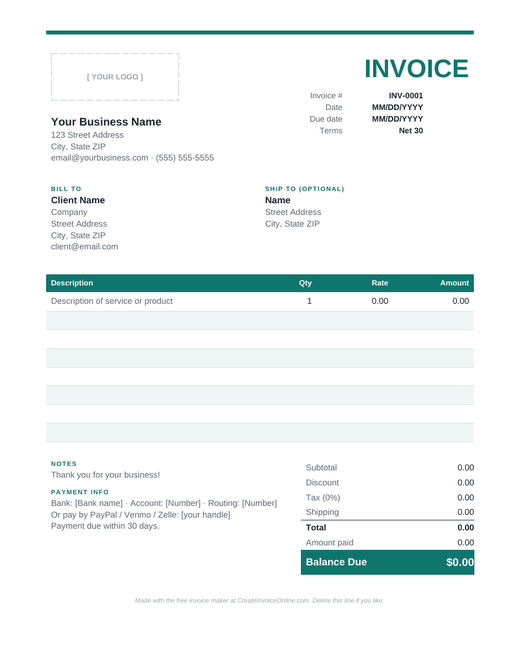
Word invoice template
- Editable .docx for Word, Google Docs, Pages and LibreOffice
- Logo spot, client info, line items and totals
- Two styles: Modern (colored) and Simple (black and white)
Free for personal and business use. Or skip the template and make your invoice online.
How to use the Word invoice template
- Download the .docx file and open it in Word. In Google Docs, go to File, then Open, then Upload. On a Mac, Pages opens it too.
- Add your logo. Click the logo placeholder, delete it, and insert your own image (Insert, then Pictures).
- Replace the sample text with your business details, your client's details, and the invoice number and dates.
- Fill in your line items. Add or delete table rows as needed. Word won't add up the totals by itself, so double-check the math, or use our Excel template, which does it for you.
- Save as PDF before sending (File, then Save As, then PDF). Clients can open a PDF on anything, and it can't be accidentally edited.
Two styles to pick from
The Modern template has a colored header row and a bold "Balance Due" box. The Simple one is black and white and prints great on any office printer. Both are fully editable: change the fonts, colors and layout however you like.
Word template vs. the online invoice maker
| Word template | Online invoice maker | |
|---|---|---|
| Needs Word or another editor | Yes | No, works in any browser |
| Adds up totals and tax | No, you do the math | Yes, automatically |
| Full control over layout | Yes | Three designs plus colors |
| Works on your phone | Kind of | Yes |
If you send a lot of invoices, the online invoice generator is usually quicker: it does the math, numbers your invoices and remembers your details. The Word template is great if you want to tweak every little thing.
Tips for a Word invoice that gets paid
- Give every invoice a unique number (INV-0001, INV-0002…). Clients and accountants rely on it.
- Put the due date near the top, not buried at the bottom.
- Spell out how to pay you, including bank details or a payment link.
- Save a copy of every invoice you send, named by number and client, e.g. "INV-0042 Smith Co.pdf".
Frequently asked questions
Is the Word invoice template free?
Yes, completely free for personal and business use. No sign-up needed.
Can I use it in Google Docs?
Yes. In Google Drive choose New, then File upload, select the .docx, then open it with Google Docs.
Will the totals calculate automatically?
Word tables do not calculate on their own. For automatic totals, use our Excel template or the online invoice maker.