Invoice Maker › Templates › Free Excel Invoice Template
Free Excel Invoice Template
A ready-to-go Excel invoice that does the math for you: line totals, subtotal, discount, tax and balance due.
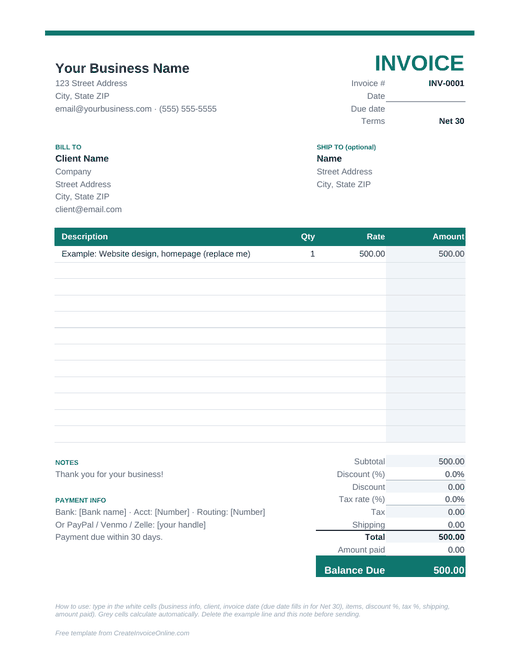
Excel invoice template
- Totals, tax, discount and balance due calculate automatically
- Works in Excel, Google Sheets, Numbers and LibreOffice
- Print-ready on one page
Free for personal and business use. Or skip the template and make your invoice online.
What's in the Excel invoice template
- Automatic math. Enter quantity and rate and each line total, the subtotal, tax and balance due update on their own.
- Tax and discount cells. Type a percentage once and it's applied to the whole invoice.
- Amount paid. Got a deposit up front? Enter it, and the balance due drops automatically.
- Print-ready. The print area is set to one page, so it prints or saves to PDF cleanly.
- Works everywhere. Excel for Windows and Mac, Excel online, Google Sheets, Apple Numbers and LibreOffice Calc.
How to fill it out
- Download the .xlsx file and open it.
- Type your business info at the top, then your client's details under Bill To.
- Update the invoice number, date and due date.
- Fill in the line items: description, quantity and rate. Only type in the white cells. The shaded cells are formulas.
- Set the tax rate and discount if you have them.
- Save as PDF (File, then Save As or Export, then PDF) and email it to your client.
Keeping track of your invoices in Excel
A simple trick: copy the invoice to a new sheet tab for each one you send, and name the tab after the invoice number. You'll end up with a tidy history of everything you've billed in one file. Add a small "Log" tab listing the number, client, total, date sent and date paid, and you've basically got free bookkeeping.
Prefer not to mess with spreadsheets?
Our online invoice maker does all the same math right in your browser, works on your phone and spits out a nice PDF. There's also a Word version and a printable blank invoice.
Frequently asked questions
Does the Excel invoice template work in Google Sheets?
Yes. Upload the .xlsx to Google Drive and open it with Google Sheets. All the formulas keep working.
How do I add more line items?
Insert a new row inside the line items table (above the last item row) and copy the formula from the Amount column into it. The subtotal includes it automatically.
Can I change the currency?
Yes. Select the money cells, open Format Cells, choose Currency and pick your symbol.