Invoice Maker › Templates › Printable Blank Invoice (PDF)
Printable Blank Invoice (PDF)
Old school works too. Print it out, fill it in with a pen, hand it over. Letter and A4 sizes.
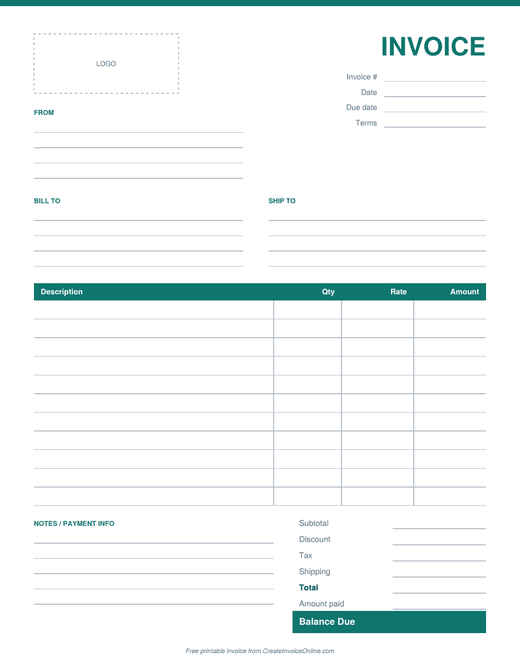
Printable blank invoice
- Print and fill out by hand
- Room for 12 line items, tax and payment details
- US Letter and A4 sizes
Free for personal and business use. Or skip the template and make your invoice online.
When a paper invoice makes sense
Plenty of businesses still hand over a paper invoice on the spot: handymen, mobile mechanics, cleaners, landscapers, farmers market vendors, and anyone working where there's no laptop handy. Keep a stack of these in the truck or your bag and you can bill the moment the job's done.
- Lined spaces for your business and client info
- Invoice number, date and due date boxes
- A big line items table with quantity, rate and amount columns
- Subtotal, tax, total and amount paid
- Room for payment instructions and a thank-you note
Tips for paper invoices
- Number them in order and keep a copy of each one. A quick phone photo of the invoice before you hand it over works great.
- Write the due date clearly. "Due on receipt" is fine for small jobs.
- Write clearly. A smudged total is the fastest way to get a confused phone call instead of a payment.
- For bigger jobs or clients who pay by email, use the online invoice maker instead. It does the math and gives you a PDF you can send in seconds.
Filling it in on a computer
You can also open the PDF in a free PDF editor (like the one built into most browsers, Adobe Acrobat Reader's "Fill & Sign", or Preview on a Mac) and type into it. But honestly, if you're on a computer anyway, the invoice generator is quicker and does the totals for you.
Frequently asked questions
What size is the printable invoice?
It comes in US Letter (8.5 x 11 in) and A4. Pick the one that matches your printer paper.
Can I put my logo on it?
The blank version has an empty logo box you can stamp or sticker. For a printed logo, make your invoice with the online invoice maker and print that instead.